


Google Calendar already holds every date a project has, and answers the question it was built for well: what is happening, and when. When the project finishes is a different question, and answering it means adding a layer rather than replacing anything. Here is what that layer does, and why the calendar stays exactly where it is.
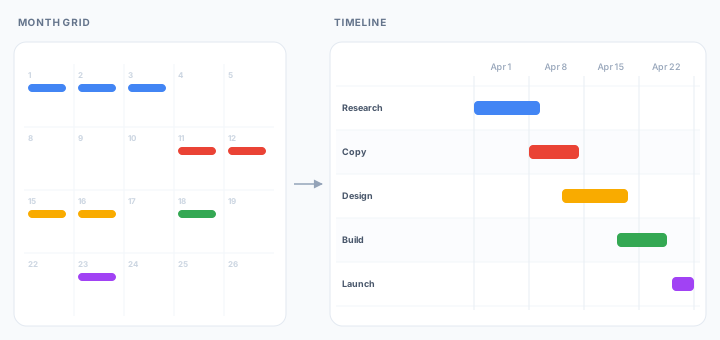
Take a website relaunch with five pieces of work in it: a content audit, a design pass, the build, a client review window, and launch day.
The order is not in dispute. The audit goes first. Design waits on the audit. The build waits on design. The review window opens once there is something to review, and launch closes it out.
The calendar does the scheduling half well
Each of those five pieces becomes an event, or a run of all-day events. Separate calendars keep client work apart from internal work. Color coding separates them on sight. Six view options ship as standard, from a single day up to a whole year, so the same six weeks can be read at whatever density suits the question.
None of that is a workaround. For a relaunch that runs to plan, a calendar is a perfectly good record of it.
What none of it carries is a connection. The audit and the design pass sit in the calendar as two unrelated blocks that happen to be adjacent, and that single gap is what every Google Calendar timeline is really trying to close.
A schedule is more than its dates
Scheduling practice has been explicit about this for decades. The GAO Schedule Assessment Guide, the standard the US Government Accountability Office uses to judge whether a program's schedule can be believed, makes sequencing its second best practice: activities must be logically sequenced and linked, so that a predecessor starts or finishes before its successor.
Any missing or incorrect logic relationship is potentially damaging to the entire network. Complete network logic between all activities is essential if the schedule is to correctly forecast the start and end dates of activities within the plan.
GAO Schedule Assessment Guide
As a general rule, it adds, every activity should have at least one predecessor and at least one successor. An activity with neither has to be justified in writing.
A calendar event is not that kind of activity, and was never intended to be. It records a commitment: this, on this day, with these people. The relationship between two commitments belongs to a planning layer sitting above the calendar, which is why it usually survives only in the memory of whoever made the plan.
The reason this is a best practice rather than bookkeeping: sequencing is what lets a schedule work as a predictive model. Change one duration and a linked schedule tells you what it costs. A set of dates with no links cannot, so the forecast gets re-derived by hand, by the person who happens to remember the order.
Then an estimate moves
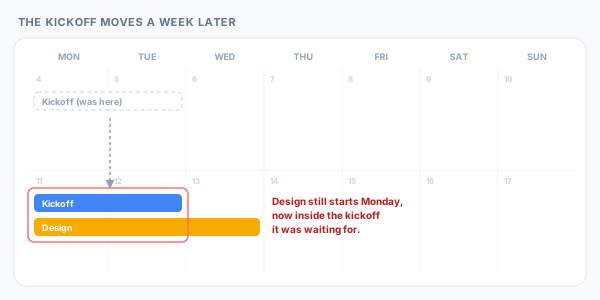
Estimates move. Say the content audit turns up four hundred pages nobody counted and runs a week longer. Dragging that event changes exactly one thing: that event.
Design still begins on the old date, which is now inside the audit it depends on. The build still begins after that. The calendar is showing exactly what it was told, faithfully. It was never told the two were connected, because there was nowhere to say so.
This is not a missing setting. An event records when it happens, who is invited, and when to remind them, and it does that job well. What waits on what is simply a different kind of fact, and until something records it the chain gets dragged into place by hand, in the right order, every time an estimate changes.
The same events, on a Gantt chart
Ganttify reads the connected calendars directly and builds the timeline from what is in them. Calendars arrive as collapsible groups, events become time blocks on a single continuous axis, and a link drawn between two blocks is a relationship the chart actually enforces.
That last part is the whole difference. Push the audit out a week and the chain moves with it. Rather than a plan to repair, the result is a new launch date to react to, which is the only thing anyone was asking about.
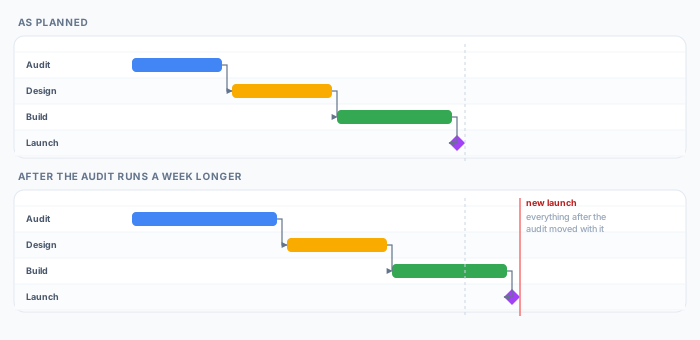
It also makes the consequence visible to everyone, not just to whoever built the plan. The dependency is drawn on the chart, so the client review that quietly became the reason the launch moved is a line somebody can point at in a meeting, rather than an argument between two people's recollections.
The chart also carries the planning structure that sits above the calendar. Blocks take a color you choose per piece of work rather than inheriting one from whichever calendar the event sits on. Groups you create on the chart hold events from any calendar and collapse to a single line, and because they live in Ganttify rather than Google, grouping for planning never means reorganising a calendar other people rely on.
Dragging a block to a new date writes that date back to Google Calendar, so the chart stays a view of the calendar instead of a second copy that drifts. And because the timeline lives outside Google Calendar, it can be published as a read-only link for the client who needs the launch date and should not need access to an internal calendar to get it.
Trying it
The Google Calendar integration is in invite-only beta as this is written. Join the waiting list and we'll send an invite as we widen access.