




Know when to start
A task in Microsoft To Do has a due date. On the chart you give it a start date too, so you see how long the work takes and when you have to begin to make the deadline.
Ganttify is the Gantt chart add-on for Microsoft To Do. See when each task has to start and what shifts when one runs late, with two-way sync and a live read-only plan to share.
No spam. We're building it and will email you when it's ready.
The question people search
Not really. Microsoft To Do keeps your tasks in lists, and the Planned list collects the ones that have a due date.
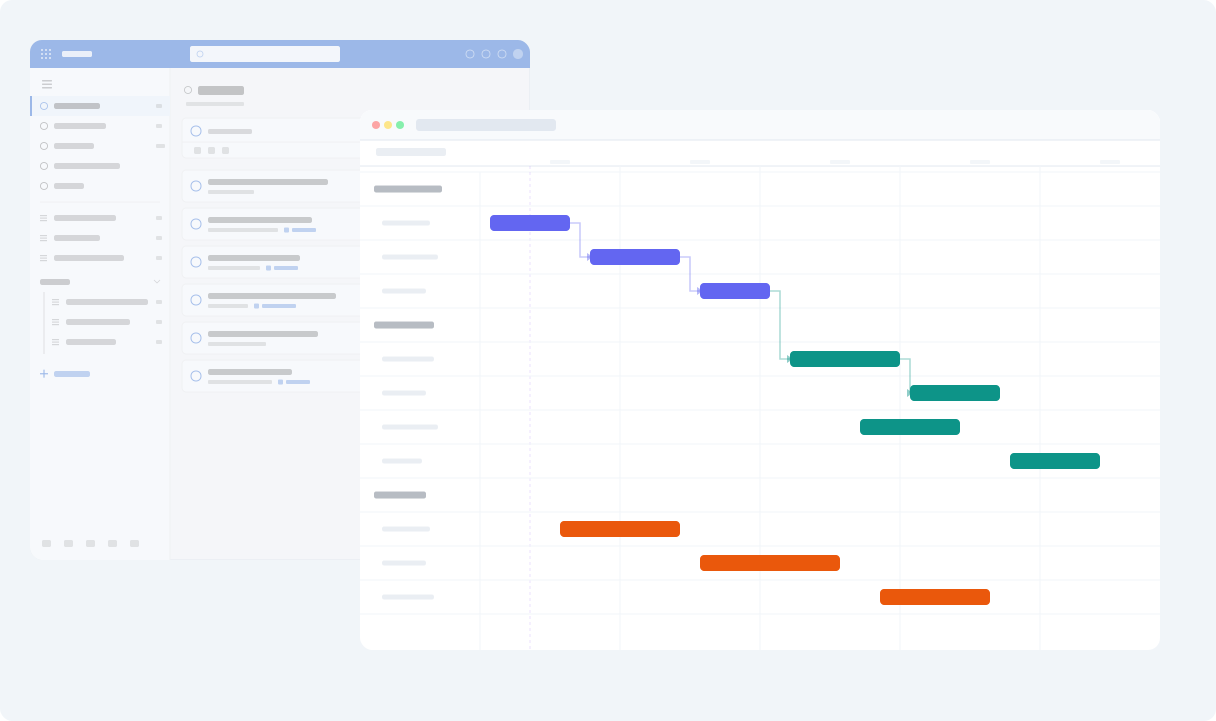
Ganttify draws one from the tasks you already have, with nothing to import. Where Planned shows what's due next, the chart shows how long each task takes and where your lists overlap.
Everything you need
See how long each task takes and which ones hold the rest up.
A task in Microsoft To Do has a due date. On the chart you give it a start date too, so you see how long the work takes and when you have to begin to make the deadline.
Set a dependency on the chart where one task waits on another, in the same list or a different one. When the first task slips three days, the tasks after it move three days too.
Pick the lists you want to see together, a client project and your own admin for example. The week where too much lands at once shows up while there's still time to move a task.
With two-way sync, a task you move or tick off on the chart changes in Microsoft To Do, and what you change in Microsoft To Do shows on the chart the next time it opens.
Share a live read-only plan. Your manager or client opens it in the browser without a Microsoft or Ganttify account and always sees the latest dates.
Export the chart as a PDF or an image when a meeting or a report needs the plan on paper.
Plan your Microsoft To Do lists on a Gantt chart
How it works
We're building the integration now, so it starts with the waiting list.
Leave your email and you're on the list.
We email you as soon as the Microsoft To Do integration is available.
Sign in with your Microsoft account and pick the lists to put on your timeline.
How would you use a Gantt chart with Microsoft To Do? Your answer shapes what we build first. A client project spread over three lists, or a launch your manager wants dates for?
Share how you'd use itQuestions
The short answers. For everything else, the help center has the long ones.
The Planned list shows the tasks that have a due date, in the order they're due. Ganttify shows how long each task takes and which tasks wait on others, with several lists together on one timeline.
Ganttify keeps the dependencies you set on the chart, between tasks in one list or across lists. When a task moves, the tasks that wait on it move with it, and Microsoft To Do gets their new due dates.
Only what you change on the chart. With two-way sync, a task you move gets its new due date in Microsoft To Do, and a task you tick off on the chart is completed there too. What you change in Microsoft To Do shows on the chart the next time it opens.
Yes. Pick the lists you want and they share one timeline, each as its own group, with dependencies between tasks in different lists.
Yes. Share a live read-only plan of your Gantt chart. Clients and stakeholders open it without a Microsoft or Ganttify account, and it updates as your tasks change. To plan together, share the chart with your team and decide who can view it and who can edit it.
Your lists and tasks stay in Microsoft To Do, and the dates you change on the chart are saved there too. Ganttify keeps only the planning it adds itself: your chart settings, the dependencies you set and the colors of your time blocks.
Nothing extra. Microsoft To Do will be part of the regular Ganttify plans, and one subscription covers every app you connect. See pricing.
Not yet. We're building it. Join the waiting list and we'll email you when it's ready. To tell us how you'd use it, email [email protected].
Every integration
Dependencies, sharing and export work the same way for every integration. Connect yours, pick a project and your first chart is there.
Join the waiting list and we'll email you when the integration is ready.
Also available for Trello, Basecamp, Todoist, Google Calendar and GitHub.