




Splitting work across separate calendars is good hygiene and poor planning. One calendar per client keeps the boundaries clean, keeps sharing narrow, and leaves the project itself with no single place it can be read. Here is where the seams appear and how to close them without collapsing everything into one calendar.
A studio running three clients typically ends up with at least four calendars: one per client, plus an internal one carrying holidays, standups and the things that belong to no client in particular. Each is shared with a different group of people, which is exactly why the split exists.
The trouble starts when a single project draws on more than one of them. A launch needs the client calendar for review windows, the internal calendar for the build, and a shared design calendar for the people doing the work.
Everything lands in one column
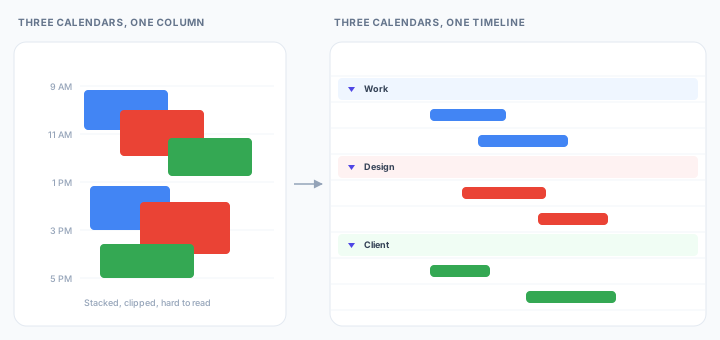
Google Calendar overlays selected calendars in the same grid, distinguished by color. For a day view that is the right behavior, because the question being asked is what happens next.
Across a project it is answering a different question than the one being asked. Concurrent events stack and clip, color is doing the work of a label, and no arrangement of the grid gives the client calendar a band of its own. Turning calendars off one at a time restores legibility by removing most of the project from view.
Sharing is per calendar, not per project
Access is granted a whole calendar at a time. The available levels run from see only free/busy through to make changes and manage sharing, and each applies to everything the calendar contains.
So there is no way to show a client the four dates that concern them without showing them the calendar those dates live on. The usual response is a fifth calendar created specifically to be shared, which is a second copy of the plan, maintained by hand, drifting from the first.
The reverse problem lands on anyone who needs the whole picture. Seeing the project end to end means holding at least see event details on every calendar feeding it. Miss one and the timeline has a hole in it that looks exactly like free time.
The seam is the risk
This is not merely untidy. Handing work from one team to another is the point a schedule is most likely to fail, which is why scheduling standards single it out. The GAO Schedule Assessment Guide requires a schedule to be traceable horizontally, linking the products and outcomes of one activity to the activities that depend on them, and it names those links hand-offs. Its examples are hand-offs between separate teams and deliveries between organizations, which is precisely the client-to-studio boundary a per-client calendar draws.
The schedule should be horizontally traceable, meaning that it should link products and outcomes associated with other sequenced activities.
GAO Schedule Assessment Guide
A calendar split by team draws a line exactly where the schedule most needs a link, and then offers no way to record one across it. The dependency still exists. It is just that nothing in the tool knows about it, so it survives as an understanding between two people, which lasts until one of them is on leave.
One timeline over several calendars
Ganttify connects the Google account once and takes the choice of which calendars to include as a setting on the chart. Each calendar becomes its own collapsible group, so the client work sits in a band of its own and the internal work sits below it, on a single shared axis.
Color still separates them, but color is no longer doing the work of a label, which is what makes a six-week view readable rather than merely colorful. Blocks take a color you pick for the work rather than the one inherited from the calendar it came from.
Groups are not limited to the calendars either. A group created on the chart can hold events drawn from several calendars at once, which is how a launch that spans the client calendar, the internal calendar and the design calendar finally gets a single band of its own. Collapse it and the launch is one line. None of that structure is written back to Google, so it costs nobody else a change to how they work.
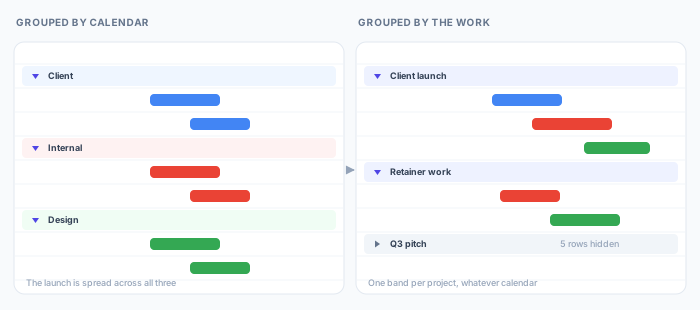
Dependencies cross those groups freely. A review window on the client calendar can hold up a build on the internal calendar, and moving the review moves the build, which is the relationship that was true all along and previously lived in somebody's head.
Sharing detaches from calendar permissions entirely. The chart publishes as a read-only link that shows the timeline and nothing else, so a client sees the plan without being granted anything on the calendars behind it, and without needing a Google account to open it.
Trying it
The Google Calendar integration is in invite-only beta as this is written. Join the waiting list and we'll send an invite as we widen access.